Search This Blog

Showing posts with label Screen Shots. Show all posts

Friday, December 11, 2009

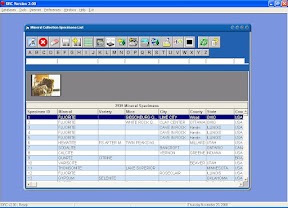
DRC 2.0 Walk Through: Image Capture Screen

Here is the updated Image Capture Screen.
Linked to Mineral List, Mineral Seatch, and Periodic Table screens.
(This was included in DRC 2.0.026 Update).

Thursday, January 1, 2009

DRC Map showing mines in Europe

Here is a sample map created with Digital rockhounnd's companion showing mines in europe.
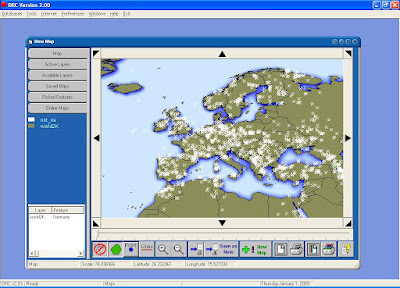


Steps to ceate this map are easy:
1) Click menu, select Map Builder
2) Click on the Available Layers tab.
3) Add the following map layers in order:
A) Select World BackGround Image and click insert button at bottom of screen.
B) Select Countries of the world Shape layer and click the insert button.
C) Select Mines outside North America Shape layer and click the insert insert button.
D) Click on the Map Tab and use the navigation arrow buttons and zoom buttons to include the area of interest. (Europe in this case).

Friday, December 5, 2008

DRC 2.0 Walk Through: Mineral Collection Storage - Specimen Tab

Database Menu
>>Mineral Storage
>>>>Browse

Displays all of the specimens you have associated with that location.

DRC 2.0 Walk Through: Mineral Collection Storage

Database Menu
>>Mineral Storage
>>>>Browse

Create your own storage location for your mineral collection. This becomes an very useful feature when you have a large collection. Use it to track where your specimens are.

DRC 2.0 Walk Through: Mineral Collection Storage List

Database Menu
>>Mineral Storage
>>>>List

Searchable/ filterable list of mineral storage locations you have configured in DRC.
Shown are my personal locations (not distributed) with DRC.

DRC 2.0 Walk Through: Business Contacts

Database Menu
>>Contacts
>>>>Browse

View, add, delete, or modify business contacts within DRC. It comes preloaded with mineral and lapidary shops for the US.

DRC 2.0 Walk Through: Magazines

Database Menu
>>Magazines

View, add, delete, or modify magazine issues for your favorite mineral related publication.
DRC comes with a partial index for Mineralogical Record and for Rock and Minerals Magazine.

DRC 2.0 Walk Through: USGS Topographic Map Index

Database Menu
>>Maps
>>>>Topo Maps
>>>>>>Browse

You can Browse through all of the USGS Topo map index database records that are referenced by mines and locations with DRC.

DRC 2.0 Walk Through: Place displayed on Google Map

Every location, place or mine in DRC can be displayed on Google Maps integrated with DRC.

DRC 2.0 Walk Through: USGS Place Name Record

After searching for a Place name, selecting the record opens the record.

DRC 2.0 Walk Through: USGS Place Name Search

Database menu
>>Places
>>>>Search

This screen allows you to search over 1 million records for place names for locations or points of interest that appear on any USGS map. Map data is current to circa 1997.

DRC 2.0 Walk Through: Digital Map Layer Record

Database Menu
>>Digital Maps
>>>>Browse

Here is typical record for digital map layer. Most of the map layers are in ESRI Arcview map layer format.

DRC 2.0 Walk Through: List of Digital Map Layers

Database Menu
>>Digital Maps
>>>>List

Filterable list of digital map layers that are included with digital rockhound's companion.

DRC 2.0 Walk Through: Mine Displayed on Digital Map

Any mine or location in DRC can be displayed on a digital map.

Thursday, November 20, 2008

DRC 2.0 Walk Through: Mineral Collection Slide Show

Databases Menu
>>Mineral Collection
>>>>Image Slide Show: Displays all mineral specimen photos

DRC 2.0 Walk Through: Mineral Collection Search

Databases Menu
>>Mineral Collection
>>>>Search

Showing an example of finding all Rockbridgeite specimens from New Jersey USA

DRC 2.0 Walk Through: Mineral Collection List

Databases Menu
>>Mineral Collection
>>>>Browse - List: Filterable and sortable list of all specimens in the mineral collection database.

DRC 2.0 Walk Through: Mineral Collection Treeview

DRC 2.0 Walk Through: Mineral Collection - Images Tab

Databases Menu
>>Mineral Collection
>>>>TreeView: Display collection organized by Species

DRC 2.0 Walk Through: Mineral Collection - Images Tab

Databases Menu
>>Mineral Collection
>>>>Browse - Images Tab _Displays all images associated with specimen.

DRC 2.0 Walk Through: Mineral Collection - Reports Tab

Databases Menu
>>Mineral Collection
>>>>Browse - Reports Tab: Summary reports that can be run on the mineral collection database.


Species List


Summary by Year

My Adsense